Udise Plus Student Module
Welcome, all! Udise Plus, Udise Plus Student Module 2025-26 Login I share complete all information related @ udiseplus.gov.in Udise Plus Student Module.
The UDISE+ Student Module 2025-26, part of India’s Unified District Information System for Education Plus, streamlines student data management for 1.49 million schools, covering 264 million students. It tracks enrollment, dropouts, transfers, and benefits like mid-day meals, using a unique Permanent Education Number (PEN) for each student.
What is the UDISE+ Student Module?
The UDISE+ Student Module is a web-based system designed to manage student-related data efficiently. It supports real-time tracking of key educational indicators, such as enrollment and dropout rates, and ensures transparency through audit trails and validation checks. The module is critical for:
- Maintaining Accurate Records: Each student is assigned a unique Permanent Education Number (PEN) for consistent tracking.
- Supporting Policy Decisions: Data informs evidence-based policies and resource allocation.
- Promoting Transparency: Reduces errors and duplication in student data.
- Enhancing Educational Planning: Helps authorities plan infrastructure and teacher recruitment based on real-time needs.
The 2025-26 version introduces improved usability, bulk import options, AI-based data analysis, and mobile app integration to simplify data entry and enhance accuracy.
Why is the Student Module Important?
The Student Module plays a pivotal role in India’s education system by:
- Reducing Dropouts: Identifies gaps to address dropout issues.
- Supporting Right to Education (RTE): Monitors attendance and enrollment to ensure compliance.
- Tracking Benefits: Ensures students receive entitlements like mid-day meals, textbooks, and uniforms.
- Improving Resource Allocation: Provides data for infrastructure and teacher recruitment planning.
With over 1.5 million schools contributing data, the module is a cornerstone of India’s education database, aligning with the National Education Policy (NEP) 2020 and Sustainable Development Goal 4 (SDG-4) for equitable education.
How to Log In to the UDISE+ Student Module 2025-26
Logging into the UDISE+ Student Module is straightforward. Follow these steps to access the system:
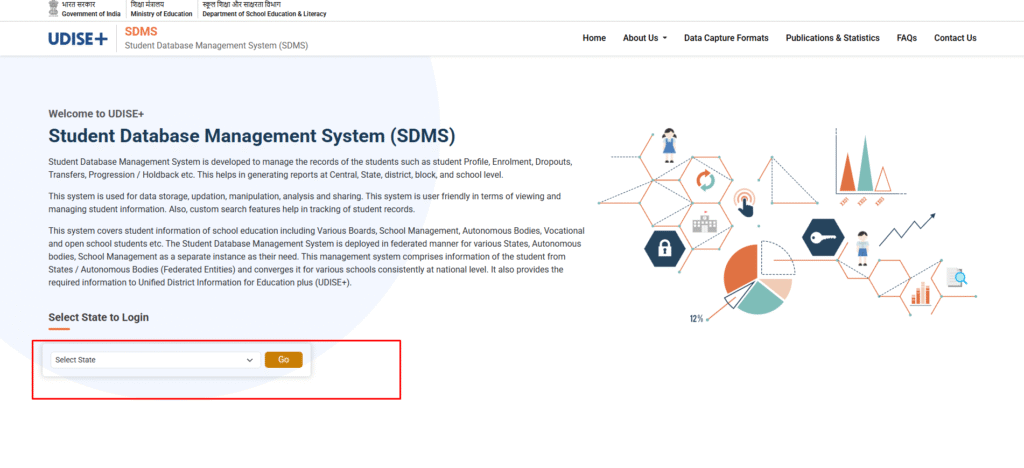
- Visit the Official Portal:
- Go to the UDISE+ Student Module at https://sdms.udiseplus.gov.in/ or the main UDISE+ portal at https://udiseplus.gov.in/.
- Select “Login for All Modules” on the homepage.
- Select Your State:
- Choose your state from the dropdown menu to access the relevant module.
- Enter Login Credentials:
- Username: Use the school’s 11-digit UDISE code.
- Password: Enter the password provided by the Block MIS Coordinator.
- Captcha: Input the captcha code displayed on the screen.
- Access the Student Module:
- Click “Submit” to view available modules.
- Select the “Student Module” to open the dashboard.
- Log Out for Security:
- After completing your tasks, log out to ensure data security.
Tip: If you forget your username or password, contact your Block or District MIS Coordinator for assistance. They can recover the username (UDISE code) or reset the password.
Using the UDISE+ Student Module
Once logged in, the Student Module dashboard allows schools to manage student data in three main categories:
- General Profile (GP): Update details like name, date of birth, gender, Aadhaar number, and parents’ names.
- Enrollment Profile (EP): Record admission number, class, section, and promotion status.
- Student Facilities (SF): Track benefits like mid-day meals, textbooks, uniforms, and scholarships.
Key Tasks in the Student Module
- Select Academic Year:
- Choose 2025-26 to ensure data is entered for the correct year.
- Update Student Progression:
- Access the “Student Movement and Progression” section from the left menu.
- Select the class and section, then update each student’s status (e.g., promoted, retained, transferred, or dropped out).
- For transfers, enter the new school’s UDISE code and submit for approval.
- Add New Students:
- Use the “Add Student” option to enter details for new admissions, including their Permanent Education Number (PEN).
- Download the bulk upload Excel template from https://udiseplus.gov.in/ for faster data entry.
- Verify and Submit:
- Use built-in validation checks to ensure data accuracy.
- Submit and lock the data for the academic year once verified.
- Generate Reports:
- Create reports at school, block, district, or state levels to analyze enrollment, dropout rates, and more.
Best Practices for Accurate Data Entry
- Regular Updates: Update student data monthly to maintain accuracy.
- Cross-Verification: Double-check entries before submission to avoid errors.
- Staff Training: Ensure teachers and staff are trained on using the module effectively.
- Data Privacy: Follow strict protocols to safeguard sensitive student information.
Challenges and Solutions
While the UDISE+ Student Module is user-friendly, some challenges may arise:
- Login Issues: If the UDISE code is not recognized, verify it with the Block MIS Coordinator or escalate to the District MIS Officer.
- Missing Records: Add missing students as new entries or check for syncing issues with the Block MIS Coordinator.
- Data Errors: Use the module’s validation tools to identify and correct discrepancies before submission.
For additional support, schools can refer to the UDISE+ user manual or contact their Block/District MIS Coordinator.
Benefits of the UDISE+ Student Module 2025-26
The updated module offers several advantages:
- Real-Time Insights: Tracks student performance and school metrics instantly.
- Advanced Analytics: AI-based tools identify trends and gaps in education data.
- Mobile Integration: Allows data updates via mobile devices for convenience.
- Streamlined Processes: Bulk import and automated validation reduce manual errors.
These features make the module a powerful tool for educators and policymakers, ensuring data-driven decisions to enhance education quality.
Conclusion
The UDISE+ Student Module 2025-26 is an essential tool for managing student data across India’s vast education system. By following the login steps and best practices outlined above, schools can ensure accurate and timely data submission. This supports evidence-based policymaking, resource allocation, and the goals of NEP 2020 for inclusive education. For the latest updates and detailed guidelines, visit https://udiseplus.gov.in/ or consult your Block MIS Coordinator. Accurate data entry is not just a task—it’s a step toward improving educational outcomes for millions of students.